This is the information collection for the Upgrade of NEA SMART 2.0 to work with the latest Backend and upgrade from different Versions.
7fa4ff68ec04a99d7528d5085f94907f4d1dd1c5381bacdc832ed5c960214676
Wi-Fi / LAN connection is cruical for communication with the NEA SMART 2.0 APP.
Recommended is a connection via Ethernet Cable but Wi-Fi is also possible. (Videoguide for Pairing and Wi-Fi Connecting)
The WPS connection is an easy way to establish a permanent WIFI connection between the router and the Base.
| Settings | Configuration |
|---|---|
| Radio Frequency | 2,4 GHz |
| Wi-Fi Multimedia (WMM) | Disabled |
In Cloud Mode, four variants of LED flashing are possible, indicating the connection status between the base and the router or server.
| LED status | Connection status | Comment | Wi-Fi / LAN LED blink code | |
|---|---|---|---|---|
| A | 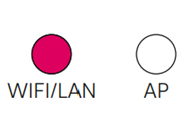
|
Base is communicating with the server | Normal case | 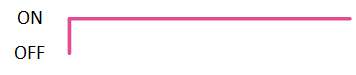
Permanent ON |
| B | 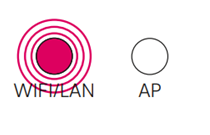
|
Base is not connected to the router | That's the case when:
|
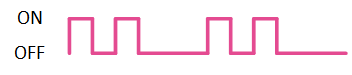
0,4s ON/ 0,4s OFF/ 0,4s ON/ 1,6s OFF/… |
| C |
|
Base is connected to router and the Base can't reach the server | That's the case when:
|
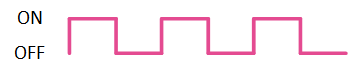
1s ON/ 1s OFF/ 1s ON/ 1s OFF/… |
| D |
|
Base is connected to router and the Base can reach server but the certificate at the Base is not valid | Please contact our Support for assistend. | 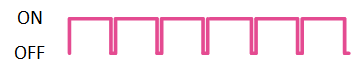
cycle time 0.8 sec. duty cycle is 7/8 ON 1/8 OFF |
In Cloud Mode, four variants of LED flashing are possible, indicating the connection status between the base and the router or server.
| LED status | Connection status | Comment | Wi-Fi / LAN LED blink code | |
|---|---|---|---|---|
| A |
|
Base is communicating with the server | Normal case |
Permanent ON |
| B |
|
Base is not connected to the router | That's the case when:
|
1s ON/ 1s OFF/ 1s ON/ 1s OFF/… |
| C |
|
Base is connected to router and the Base can't reach the server | That's the case when:
|

Short flash of Wi-Fi/LAN LED during certificate check with server (about 3s On and then flashing like not connected to server, repeating after a period) |
| D |
|
Base is connected to router and the Base can reach server but the certificate at the Base is not valid | That's the case when the certificate of the NEA SMART 2.0 Base is not up to date. Please follow the Update guide for Software below 1.70 |
Short flash of Wi-Fi/LAN LED during certificate check with server (about 3s On and then flashing like not connected to server, repeating after a period) |
| Protocol | Port |
|---|---|
| MQTT (legacy) | 1883 |
| MQTTS | 8883 |
| HTTP | 80 |
| HTTPS | 443 |
For more information we also recomend our tutorials and manuals.
| Country | Contact Mail |
|---|---|
| Austria | service.at@support.rehau.com |
| Belgium | support.be@rehau.com | Bulgaria | service.bg@support.rehau.com |
| Czech | service.cz@support.rehau.com |
| France | mailbox.poletechniquechauffagefr@rehau.com |
| Germany | service.de@support.rehau.com |
| Greece | service.gr@support.rehau.com |
| Hungary | service.hu@support.rehau.com |
| Italy | service@rehau.com |
| Netherlands | support.nl@rehau.com |
| North Macedonia | service.mk@support.rehau.com |
| Poland | service.pl@support.rehau.com |
| Rumania | service.ro@support.rehau.com |
| Slowakia | service.sk@support.rehau.com |
| Switzerland | gebaeudetechnik.ch@rehau.com |
| Turkey | service.tr@support.rehau.com |
| Ukraine | service.ua@support.rehau.com |
| United Kingdom | support.uk@rehau.com |
Engineering progress
Enhancing lives